Smart Bulbs Require Leaving the Switch On. A Smart Switch Puts the Intelligence in the Wall Where It Belongs.
Smart bulbs have a fundamental problem: they need the physical switch left on at all times. The moment someone flips the switch off — which is what light switches are for — the bulb loses power and drops off the smart home network. A smart wall switch solves this by putting the WiFi radio in the switch itself, not the bulb. Use any dimmable LED you want, control it from your phone or with your voice, and the physical switch still works normally for everyone in the household who doesn't know or care about the app. The Kasa KS220 replaces a standard single-pole switch with this setup for about $25, no hub required. 4.6 stars, 5,000+ verified buyers.
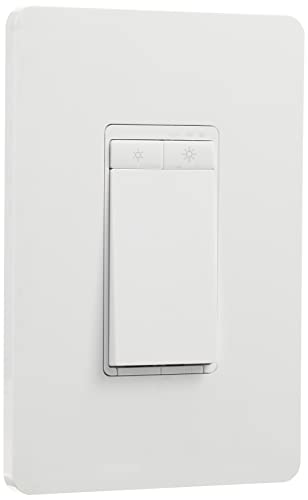
Kasa Smart Dimmer Switch KS220
Is This Page For You?
- ✓You want smart dimming without replacing your bulbs — the KS220 dims whatever bulb is already in your fixture, as long as it's a dimmable LED or CFL. No new bulbs, no per-fixture cost. For rooms with 4–6 recessed lights, one switch controls everything.
- ✓You live with people who use wall switches and won't use an app — the physical paddle on the KS220 works exactly like a normal dimmer switch. You can also program a default dim level for the paddle, so household members who don't engage with the smart features still get a useful switch.
- ✓You're comfortable with a basic electrical swap — replacing a light switch requires turning off the breaker, disconnecting 2–3 wires, and connecting them to the new switch. No electrician license required. Reviewers who had never done electrical work before describe completing it in 15–20 minutes. The KS220 ships with a wire compatibility guide.
- ✗You have a 3-way switch configuration — the KS220 is single-pole only. A 3-way switch (two switches controlling one light — common on stairs and hallways) requires the KS230 kit (sold separately with an add-on switch). Verify your switch type before ordering.
Installation: What to Know Before You Start
Turn off the breaker first. The KS220 connects to line voltage — 120V. Always kill power at the breaker panel, then use a non-contact voltage tester to confirm the wires are dead before touching them.
Neutral wire situation: Many older homes (pre-2000) don't have a neutral wire in the switch box. The KS220 supports no-neutral wiring on most configurations, but this can cause dimming issues at very low light levels (flickering near 5–10%) with some LED bulbs. Reviewers who installed without a neutral wire on quality LED bulbs (Cree, Philips) generally report no issues.
What you'll find in the box: The switch, a face plate, wire nuts, and a setup guide. Wire connectors are the push-in type — insert stripped wire end, done. The setup guide includes a wiring diagram for neutral and no-neutral configurations.
Time estimate: First install, 20–30 minutes including confirming power is off, photographing existing wiring before disconnecting, and connecting new wires. Second and subsequent installs: 10–15 minutes.
What Verified Buyers Report
The KS220's physical dimmer works smoothly at every level of the dimming range in reviewer reports. The most common comparison: reviewers who previously had basic smart plugs or smart bulbs describe the switch as feeling like a real upgrade — the fixture behaves like a normal dimmer switch that also happens to have app and voice control.
Reviewers who set up sunrise/sunset schedules, bedtime dim routines, and away-mode random schedules describe the Kasa app setup as clear and fast. The scheduling interface is more direct than Alexa Routines for reviewers who prefer to work from the Kasa app rather than their voice assistant.
Some reviewers note flickering when the light is dimmed below about 15% with specific LED bulb brands. This is a known compatibility issue between smart dimmers and certain LED driver designs — not specific to Kasa. Fix: use bulbs rated "compatible with dimmers" from brands like Cree, GE Reveal, or Philips. The KS220 ships with a bulb compatibility list.
Specs at a Glance
| Switch type | Single-pole (for 3-way, see KS230 kit) |
| Protocol | WiFi (2.4GHz) — no hub |
| Compatibility | Alexa, Google Home — no Apple HomeKit |
| Neutral wire | Optional — works with or without neutral |
| Bulb types | Dimmable LED, CFL, incandescent |
| Max load | 150W LED / 600W incandescent |
| Controls | Physical paddle + Kasa app + voice |
| Scheduling | Sunrise/sunset, custom times, away mode |
More Smart Home Reviews
Get our best picks in your inbox
No spam. Just honest Amazon reviews, once a week.
Unsubscribe any time. We'll never sell your address.